
Best reset-first option: Método AS. Best for daily focus: a paper daily planner. Best for calendar control: a weekly time-block planner. This 2026 guide compares the best productivity planners for entrepreneurs by the problem each solves, including project visibility and flexible planning.
- Among the best productivity planners for entrepreneurs, Método AS is the reset-first choice for overwhelmed founders.
- Choose a paper daily planner when you need a clear next action, not another planning system.
- Choose a weekly time-block planner when commitments compete for calendar space.
- Choose a Kanban board for project visibility; choose a bullet journal for flexible notes and planning.
Why this matters
A productivity planner gives your commitments somewhere to live. It does not decide which commitments deserve your attention. If your business has too many competing priorities, a longer task list leaves the underlying decision untouched.
Start with the failure you want to fix: unclear priorities, crowded days, scattered projects, or notes you cannot find. Then choose the format. The right planner makes your next decision easier; the wrong planner creates another system to maintain.
Método AS belongs in this comparison as a productivity reset, not as a conventional diary. Its digital program includes a PDF guide, a decision template, and an audio reset. That distinction matters if you need help refocusing before you start scheduling.
What makes the best productivity planners for entrepreneurs
For this 2026 comparison, judge a planner against these criteria rather than its appearance:
- Priority selection: Can you separate the work that matters from the work merely asking for attention?
- Capacity visibility: Can you see whether your commitments fit into the day or week?
- Maintenance burden: Does keeping the planner current require more effort than you want to give it?
- Retrieval: Can you find a decision, task, or project status when you need it?
- Recovery: Can you restart after an interrupted day without rebuilding everything?
These criteria expose different strengths. A calendar shows capacity but does not explain why a project matters. A project board shows work in progress but does not reserve time to finish it. A reset program addresses focus differently from either format.
Do not ask one tool to do every job. Choose a primary approach, then add a supporting format only when a specific gap remains.
Productivity planning options at a glance for 2026
| Option | Best for | Standout feature | Key limitation |
|---|---|---|---|
| Método AS | Resetting focus before planning | Digital 21-day program with a PDF guide, decision template, and audio reset | Not a conventional dated planner |
| Paper daily planner | Choosing today's next action | A bounded daily view | Does not automatically show the whole week |
| Weekly time-block planner | Protecting calendar capacity | Tasks assigned to visible time periods | Needs revision when commitments change |
| Kanban board | Seeing project status | Tasks arranged by workflow stage | Does not reserve calendar time |
| Bullet journal | Combining notes and flexible planning | An adaptable notebook-based method | Requires you to maintain its structure |
The ranking follows the needs of an overwhelmed entrepreneur, not a feature count. Each option has a separate job. The first choice addresses the reset problem; the remaining choices address how you organize the work afterward.
1. Método AS: best productivity reset for scattered entrepreneurs
Método AS is a digital 21-day productivity reset program for overwhelmed, scattered entrepreneurs seeking better focus and mental clarity. It includes a PDF guide, a decision template, and an audio reset. It is not presented as a dated daily or weekly planner.
Método AS is the reset-first choice for overwhelmed entrepreneurs who want to refocus before choosing a planner. That is its place in this guide: before calendar design, task tracking, or notebook customization.
Choose the program when your question is about focus rather than where to record an appointment. A separate planning format serves a different purpose if you also need to track deadlines and daily commitments. Do not mistake the presence of a decision template for a full calendar system.
Método AS pros:
- Directly targets overwhelmed, scattered entrepreneurs.
- Provides a defined 21-day program rather than an open-ended notebook.
- Includes written material, a decision template, and audio.
Método AS cons:
- Is not a conventional dated planner.
- Its stated materials do not establish calendar or task-management functionality.
- Requires participation; buying a program does not complete it.
Best for: Entrepreneurs seeking a structured reset before reorganizing their workload.
Verdict: Buy for a focus reset; skip as a replacement for your calendar.
2. Paper daily planner: best productivity planner for immediate focus
A paper daily planner gives you a place to record today's work, appointments, and reminders. Choose a layout with a clear space for the main priority and enough room for the commitments you actually have. Decorative sections are not a substitute for usable writing space.
This format suits the entrepreneur who understands the priorities but keeps losing the next action among messages and notes. You can leave the page open beside your work. The trade-off is that a daily page needs another view for commitments beyond today.
Start by writing 1 priority task before adding smaller actions. This is a planning recommendation, not a promise about output: the purpose is to make your intended focus explicit. If that task does not fit around today's appointments, change the plan before starting.
Paper daily planner pros:
- Keeps the day's chosen work in one visible place.
- Separates planning from a screen-based task list.
- Works without designing a custom notebook structure.
Paper daily planner cons:
- Requires manual updates when plans change.
- Offers limited project context on an individual daily page.
- Can become an archive of unfinished lists without regular review.
Best for: Solo entrepreneurs who need a clear daily working page.
Verdict: Buy for daily execution; skip if project visibility is your main problem.
3. Weekly time-block planner: best productivity planner for calendar control
A weekly time-block planner assigns work to periods of time instead of leaving it in an undated list. You can use a weekly paper layout or a calendar view. The defining feature is the connection between a task and the time you intend to spend on it.
Choose this approach when meetings, delivery work, and business development compete for the same working hours. Put fixed commitments on the schedule first. Add focused work around them, leaving space for responsibilities you already know interrupt the day.
For your 2026 planning setup, distinguish an appointment from an intention. A client meeting has an agreed time; a writing block is your plan for using time. Treat both visibly, but recognize which you can move without involving someone else.
Weekly time-block planner pros:
- Makes competing commitments visible together.
- Connects planned work with actual calendar space.
- Gives you a basis for accepting or declining additional work.
Weekly time-block planner cons:
- Needs revision after interruptions or schedule changes.
- Does not select priorities for you.
- Becomes misleading when every available space is filled.
Best for: Entrepreneurs whose main constraint is calendar capacity.
Verdict: Buy for scheduling discipline; skip rigid layouts if your work is highly unpredictable.
4. Kanban board: best productivity planner for project visibility
A Kanban board arranges work by its status. A simple personal version uses 3 columns: To do, In progress, and Done. Each card represents a task that moves across the board as its status changes.
This format answers a different question from a diary: where does the work stand? Use it when you need to distinguish pending work from work already underway. Write cards as actions with a recognizable finish, not broad ambitions such as improving the business.
A board also makes it easier to inspect unfinished work before starting something new. However, a task sitting in the In progress column still needs time and attention. Pair the board with your existing calendar when delivery depends on scheduled work.
Kanban board pros:
- Shows workflow status without reading a long chronological list.
- Separates pending work from active work.
- Supports a visible record of completed tasks.
Kanban board cons:
- Does not allocate time to tasks.
- Needs clear card names and current statuses.
- Becomes difficult to scan when filled with tiny or vague tasks.
Best for: Entrepreneurs managing several active projects or handoffs.
Verdict: Buy into the method for project visibility; skip as your only scheduling system.
5. Bullet journal: best productivity planner for flexible notes
A bullet journal is a notebook-based method for organizing tasks, events, and notes. Its flexible structure lets you combine planning with information that does not fit neatly into a dated page. You maintain the organization rather than relying entirely on a printed layout.
Choose this approach when business notes, decisions, and tasks need to stay together. Keep the structure simple enough that you can return after a busy period. A notebook you can use consistently is more useful than an elaborate layout you avoid updating.
Flexibility is also the limitation. You need a way to find earlier entries and review unfinished tasks. If designing pages becomes the main activity, return to plain headings and action lists.
Bullet journal pros:
- Adapts to changing planning needs.
- Keeps notes and actions within the same notebook.
- Does not require a fixed daily page format.
Bullet journal cons:
- Requires manual organization and review.
- Has no automatic reminders or synchronization.
- Leaves layout decisions to you.
Best for: Entrepreneurs who want an adaptable notebook for both thinking and planning.
Verdict: Buy a notebook for flexibility; skip elaborate layouts when maintenance already feels burdensome.
How to choose without creating another project
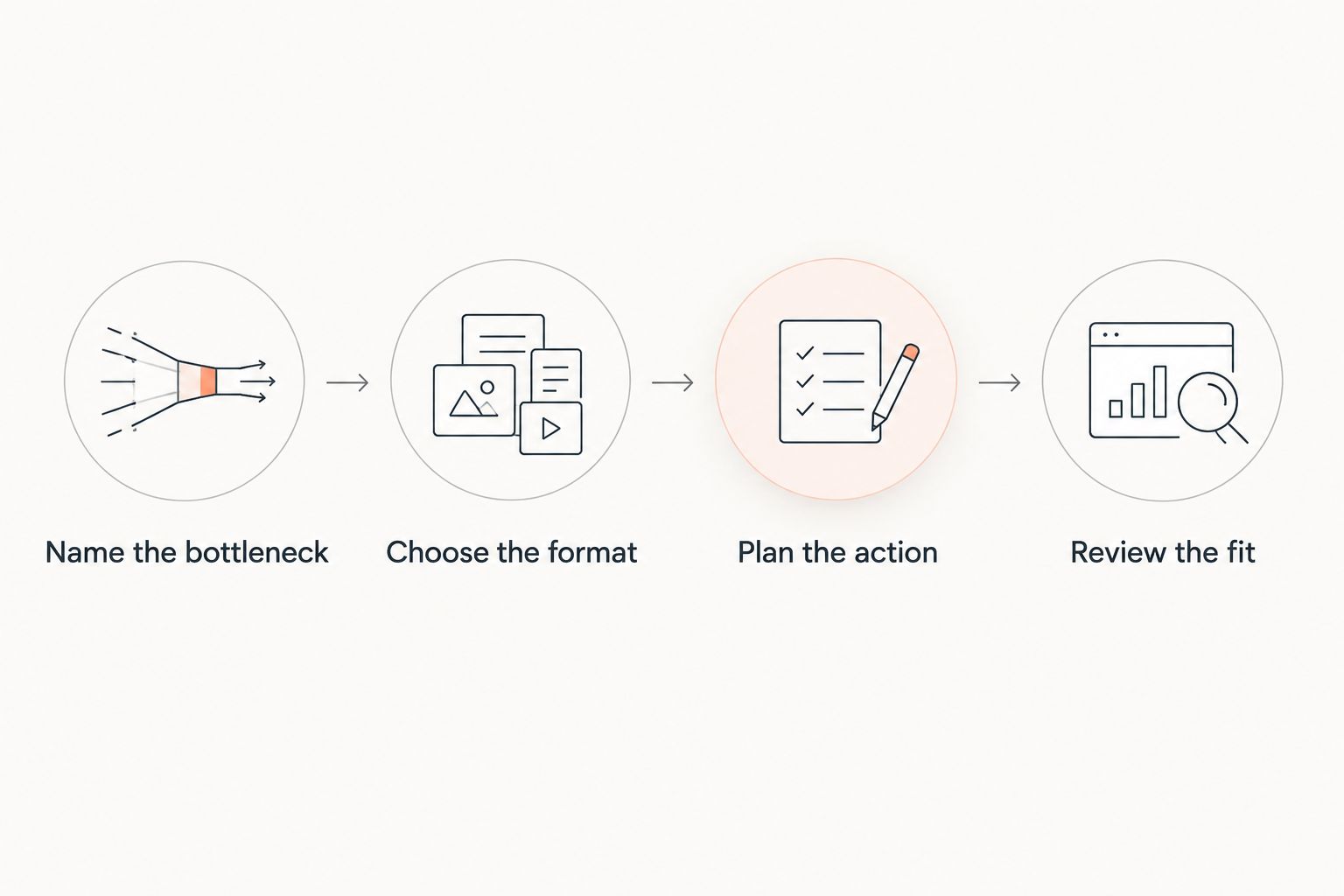
Match the failure to the format before moving your tasks. Use the following sequence to make the decision concrete:
- Name the bottleneck. Write down what is failing: choosing priorities, fitting work into time, seeing project status, or finding notes.
- Choose the format. Select the option whose main function answers that problem. Do not choose based on the longest feature list.
- Plan the next action. Enter a real piece of work, its intended finish, and any deadline you already have.
- Review the fit. After using the format, check whether the original problem is easier to handle or remains untouched.
Keep 1 weekly review as a suggested maintenance habit. Inspect unfinished commitments, remove work you no longer intend to do, and make sure active tasks still belong in the plan. This recommendation describes a routine; it is not a measured performance claim.
During that review, distinguish tasks from reference material. A useful article belongs in your notes, not necessarily on your action list. An idea deserves a place to be considered without automatically becoming a commitment.
How the options are ranked
The 2026 ranking uses priority selection, capacity visibility, maintenance burden, retrieval, and recovery. It does not represent hands-on testing, customer ratings, or measured productivity improvements.
The order reflects the stated audience: overwhelmed entrepreneurs. Resetting focus comes first for that reader, followed by daily execution, calendar control, project visibility, and flexible note-taking. Choose by the problem you have, not the position in the list.
Which productivity planner should you choose?
If you already know your priority and simply need to act on it, start with a paper daily planner. It is the default recommendation for the undecided reader because its purpose is narrow: make today's intended work visible.
If you cannot decide what deserves attention, consider Método AS for a productivity reset instead of adding more sections to a planner. If your priorities are clear but the week is crowded, choose a weekly time-block planner. Use a Kanban board for project status or a bullet journal for combined notes and planning.
For 2026, keep your starting setup deliberately small. Do not introduce several new planning systems at once. You need to see which change addresses the original problem before adding another layer.
FAQ
What are the best productivity planners for entrepreneurs in 2026?
The best productivity planners for entrepreneurs depend on the planning problem: paper daily planners support daily focus, weekly time-block planners show calendar capacity, Kanban boards show project status, and bullet journals combine notes with planning. Método AS is a separate reset-first option for overwhelmed entrepreneurs seeking focus and mental clarity.
Is Método AS a daily planner?
Método AS is a digital 21-day productivity reset program, not a conventional dated daily planner. Its stated materials are a PDF guide, a decision template, and an audio reset.
What's the best planner when I feel overwhelmed?
Choose a planner that addresses the source of the overwhelm. A daily page suits unclear next actions, a weekly schedule suits competing commitments, and a reset program serves a different need when you want to refocus before planning.
Is a paper planner better than a digital planner?
Neither format is universally better. Paper gives you a physical working page, while a digital setup can suit workflows that depend on electronic calendars or shared information; assess the specific tool before choosing.
Can I use a Kanban board instead of a calendar?
A Kanban board does not replace a calendar when your work includes appointments or time-specific commitments. Use the board to show task status and the calendar to show when scheduled work happens.
How do I stop abandoning my planner?
Reduce the planner to the information you use to make decisions. Start with your chosen priority, real commitments, and a review routine rather than adding sections you do not maintain.
Should I combine a reset program with a planner?
Combine them only if you need both refocusing and a place to organize ongoing commitments. A productivity reset and a planner perform different jobs, so identify the gap before adding either.
One last thing
Do not copy every unfinished task into tomorrow's page. First decide whether it still deserves a commitment. Carrying work forward without reconsidering it preserves the list, not the priority.
Before your next planning session, choose a task you are deliberately not doing. Record that decision where you can find it. A useful planner shows what you have chosen to pursue; a useful decision also makes clear what you have chosen to leave out.